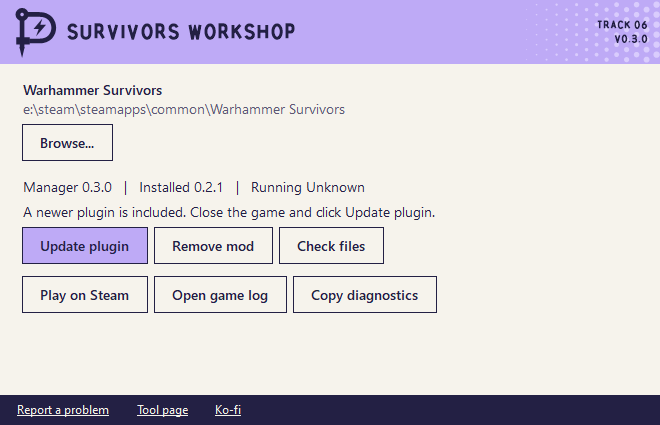
Getting started
- Close Warhammer Survivors. Extract the ZIP and open
SurvivorsWorkshopManager.exe. - Click
Apply mod. If you already used the first version clickUpdate plugin. - Click
Play on Steam. The first launch can take a few minutes while BepInEx prepares the game. - In a solo run press
F1. Press it again to close the panel.
In a run
You can show FPS, heal your character or toggle invulnerability. The invulnerability button shows whether protection is on, off or waiting for your character. Gain one level awards the XP missing from the next reward. Skip chest animation works once the game allows you to skip it.
Hotkeys
The shortcuts work with the game focused and the panel open or closed.
| Key | Action |
|---|---|
| F1 | Open or close Workshop |
| F2 | Switch invulnerability on or off |
| F3 | Heal to full |
| F4 | Gain one level |
| F5 | Skip a chest animation when the game allows it |
| F6 | Show or hide FPS |
To change a key close the game and edit the Hotkeys section of BepInEx/config/local.survivors.workshop.cfg in the Workshop runtime or your shared loader. Set a key to None to turn it off. The panel shows your bindings on the next launch.
Installation and support
Close the game and click Remove mod. Progress already saved in the game stays with your save. If you already have a compatible BepInEx installation the manager shares it and keeps your other plugins.
The manager shows its version and the installed and running plugin versions. Older plugins can show as unknown. Use Copy diagnostics to review the version details and last manager error. Use Report a problem to open the feedback form. You choose what to share.
If files were added or changed inside the private runtime the manager keeps them in a folder next to the game and shows you its location after removal.
Workshop checks Punkware for manager updates. You choose when to install one. If it includes a newer plugin you can apply it with the game closed.
Release notes
- Survivors Workshop for Warhammer Survivors
- Survivors Workshop 0.2.1
- Survivors Workshop 0.2.2
- Survivors Workshop 0.3.0
- Own logos, own fonts and updates in one click
- Punkware rocks now
- Two apps are signed now
- Now it's Punkware
Other tools
- Tower of Babel Trainer Trainer for Tower of Babel: Survivors of Chaos
- Bongo Cat Repeater Key repeater for Bongo Cat
- Ducky One 3 Keyboard Editor Keymap, macro and lighting editor for the Ducky One 3
- LumaCast Twitch streaming and quick clips
- SurvivorsLite HUD addon for Azeroth Survivors
- Sturmwrack-Riff A co-op fishing expedition for How to Fish
- Timing Bar Clicker Clicks when the marker is in the block
- Storage Hunters Collection Book Tick off every item you found