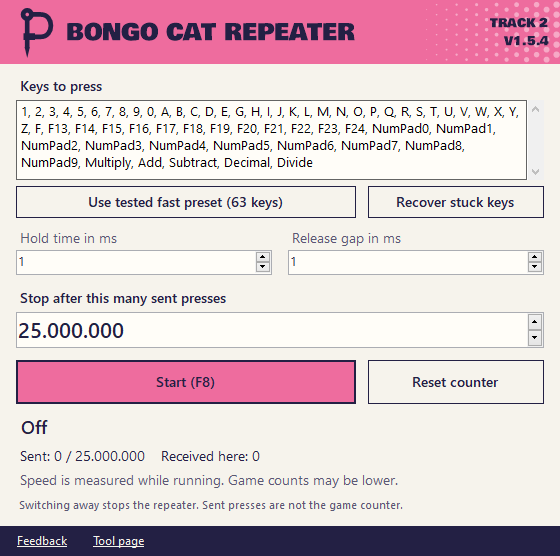
What it does
It presses the keys you list again and again while its own window has focus. It stops by itself at the target you set.
- Your own key list with up to 75 keys.
- Hold time and release gap in milliseconds.
- A tested fast preset with 63 keys and 1 ms timings.
- A target for sent presses and a live speed display.
How to use it
- Open Bongo Cat first.
- Extract the ZIP and open the repeater.
- Press
F8to start.F8orEscapestops it. - Keep the repeater focused while it runs.
When it stops by itself
- You switch to another window.
- You hold Shift, Ctrl, Alt or Windows.
- It reaches your target.
Keys pressed by the repeater get released when it stops. Keys Windows reports as already held are skipped. If all listed keys are held it waits until one is released. Escape still stops it.
Nothing starts with Windows.
If keys stay stuck after an interrupted run, stop the repeater and release your physical keys. Click Recover stuck keys before starting again. Closing the app now waits for its key releases to finish.
Good to know
- The counter shows sent presses. Bongo Cat may count fewer and speed depends on your computer.
- No game files or saves are changed. The game can save the progress from these presses though.
- Steam and the game have their own rules. This is an unofficial tool and it's your call if you want to use it.
Questions
Why does Windows still warn me about the download?
The app is signed by Andrej Schmunk so that's the publisher Windows should show. SmartScreen can still warn about new downloads until enough people have run them. It also sends key presses and some antivirus tools don't like that. You can compare the SHA-256 on this page.
Why does the game count fewer presses?
The game doesn't have to accept every press at very fast timings. Raise the hold time and release gap if you want it closer.
Why did it stop on its own?
Most likely the window lost focus. The reason is shown in the window.
Do I need to install anything?
It needs .NET Framework 4 which comes with Windows 10 and 11. The app itself runs from the folder.
Release notes
- Punkware rocks now
- Two apps are signed now
- Now it's Punkware
- Bongo Cat Repeater 1.5.1
- Bongo Cat Repeater 1.5.4
- Bongo Cat Repeater 1.5
Other tools
- Tower of Babel Trainer Trainer for Tower of Babel: Survivors of Chaos
- Ducky One 3 Keyboard Editor Keymap, macro and lighting editor for the Ducky One 3