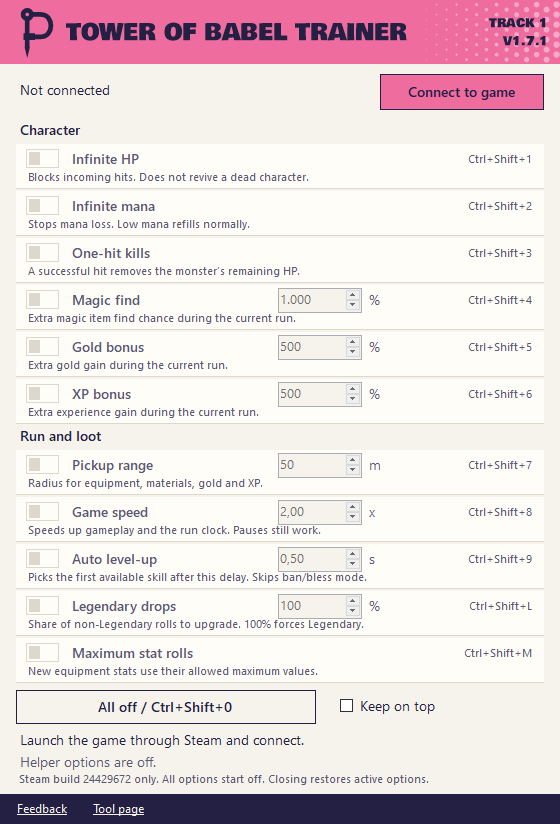
What it does
The trainer changes the running game only. No game files, no save editing and no mod loader. Every option has its own hotkey so you don't have to tab out.
| Hotkey | Option | What it does |
|---|---|---|
Ctrl+Shift+1 | Infinite HP | Blocks incoming hits. It does not revive a dead character. |
Ctrl+Shift+2 | Infinite mana | Stops mana loss. Low mana refills normally. |
Ctrl+Shift+3 | One-hit kills | A successful hit removes the monster's remaining HP. |
Ctrl+Shift+4 | Magic find | Adds to the magic find of the current run. Default +1000%. |
Ctrl+Shift+5 | Gold bonus | Adds to the gold gain of the current run. Default +500%. |
Ctrl+Shift+6 | XP bonus | Adds to the XP gain of the current run. Default +500%. |
Ctrl+Shift+7 | Pickup range | Collects equipment and materials in range. 1 to 200 m. |
Ctrl+Shift+8 | Game speed | 0.25x to 5x. Enemies and cooldowns speed up too. |
Ctrl+Shift+9 | Auto level-up | Picks the first available skill after a delay. |
Ctrl+Shift+L | Legendary drops | Upgrades the share of rarity rolls you choose. 100% forces Legendary. |
Ctrl+Shift+M | Maximum stat rolls | New equipment stats use their allowed maximum. |
Ctrl+Shift+0 | All off | Turns everything off again. |
How to use it
- Start the game through Steam and load your character.
- Extract the whole ZIP and keep the helper DLL beside the app.
- Open the trainer. It connects by itself.
- Turn on what you want. Turn it off or close the trainer to restore the game.
The window is narrow so you can keep it beside the game. Keep on top is in the window if you want it to stay there.
Good to know
- It only works with Steam build 24429672. After a game update it refuses to connect until I update it.
- Loot, XP and gold you earn stay. The game saves those and turning the trainer off doesn't undo them.
- Close it normally. If it gets force closed restart the game to clear the changes.
- This is an unofficial tool. It has nothing to do with the makers of the game. You use it at your own risk.
Questions
Why does Windows warn me about the download?
This one isn't code signed so SmartScreen shows an unknown publisher. The trainer also loads a helper DLL into the game and antivirus tools can flag that. You can compare the SHA-256 on this page. If you don't trust it don't run it.
Does it work after a game update?
No. It checks the exact game files and refuses to connect when they don't match. Nothing gets changed in that case. Send me a request if an update breaks it.
Does it change my save?
It doesn't edit saves. The game can still save what you earned while it was running.
Do I need a mod loader?
No. There's nothing to install. Extract the ZIP and open the app.
Can I run it together with another trainer?
Please don't. Close other trainers before you connect.
Release notes
Other tools
- Bongo Cat Repeater Key repeater for Bongo Cat
- Ducky One 3 Keyboard Editor Keymap, macro and lighting editor for the Ducky One 3