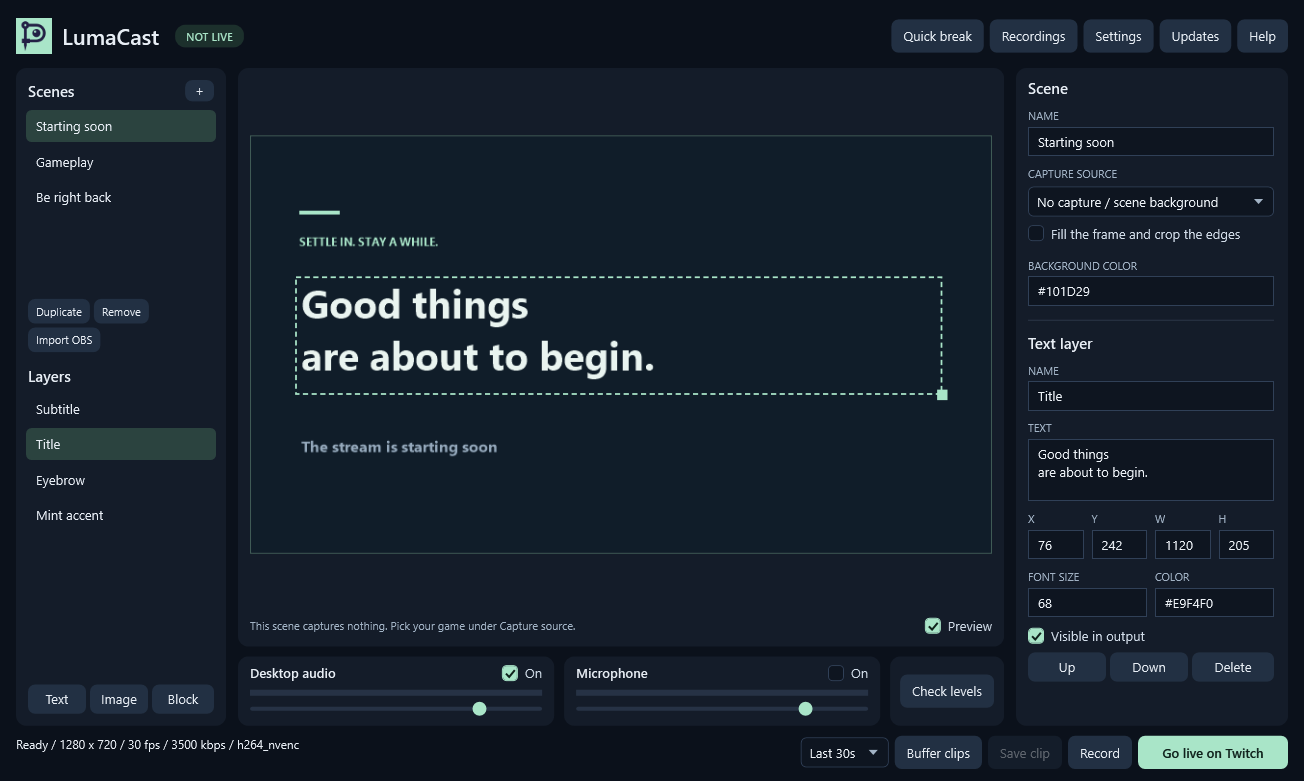
What it does
It sends your game to Twitch, records it and keeps the last seconds ready to save as a clip. Each of the three starts and stops on its own, also while the others run.
- Scenes with text, images and color blocks. Switch them with a shortcut while your game has focus.
- Window capture that leaves out whatever sits on top of the game.
- Clips of the last 30 or 60 seconds as MP4, saved without encoding again.
- If Twitch drops it reconnects until you press End stream. Your recording and clip buffer keep running.
- A sound and a small notice over the game for clips and problems.
- Reads OBS scene collections for images, basic text, colors and simple groups.
How to use it
- Extract the whole ZIP and open
LumaCast.exe. - Pick your game under Capture source. Borderless or windowed mode works best.
- Click
Check levelsto test your audio. - Open
Settingsand paste your Twitch stream key.Bandwidth testconnects without going public. - Click
Go live on Twitch,RecordorBuffer clips.
Shortcuts
You can change all of them in Settings.
Ctrl+Shift+Alt+Ssaves a clip.Ctrl+Shift+Alt+Rturns the clip buffer on or off.Ctrl+Shift+Alt+0starts a quick break and ends it again. It mutes everything for now and your audio settings stay as they are.Ctrl+Shift+Alt+1to9switch scenes.
Good to know
- Auto picks 540p on shared graphics and 720p on a dedicated GPU. Settings has 360p up to 1080p at 30 fps and a bitrate. Clips and recordings use the same picture as the stream.
- Exclusive fullscreen can stay blank. Windows 10 shows a capture border around the window.
- Webcams, browser alerts and Twitch chat aren't in this version.
- There's no telemetry. Your stream key is encrypted for your Windows account.
- It checks for a new version when it opens and only installs after you say so.
FFmpeg does the encoding and runs as a separate program. Its license is in the ZIP and here is the FFmpeg source.
Questions
Why is the download so big?
The .NET runtime and FFmpeg come with it and you don't have to install anything. FFmpeg alone is about 100 MB.
Why does Windows still warn me about the download?
The app is signed by Andrej Schmunk so that's the publisher Windows should show. SmartScreen can still warn about new downloads until enough people have run them.
Is it faster than OBS?
That depends on your PC and I haven't measured it against OBS. If your game slows down pick 360p under Quality.
Can I go back to the old download?
The older version stays on zzyx.de for now. Your scenes and stream key stay in place either way.
Release notes
- Own logos, own fonts and updates in one click
- Punkware rocks now
- Two apps are signed now
- Now it's Punkware
- LumaCast 0.6
Other tools
- Tower of Babel Trainer Trainer for Tower of Babel: Survivors of Chaos
- Bongo Cat Repeater Key repeater for Bongo Cat
- Ducky One 3 Keyboard Editor Keymap, macro and lighting editor for the Ducky One 3
- SurvivorsLite HUD addon for Azeroth Survivors