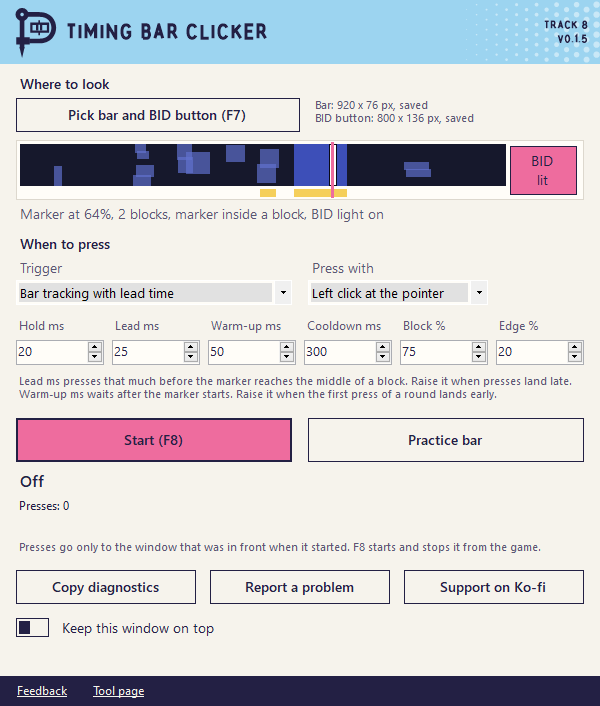
What it does
It looks at the bar on your screen, finds the white marker and the tall blocks and works out how fast the marker moves. Then it clicks a little before the marker reaches the middle of a block. That way the game gets the click in time.
- Left click where your mouse is, a click on the button you picked or a key like Space.
- Lead time, hold time, cooldown and block height to tune it.
- A second trigger that clicks when the button lights up instead.
- A practice bar to try it without a game.
How to use it
- Extract the ZIP and open the clicker.
- Open the game with the bar on screen and press
F7. - Drag a box around the bar, then over the button to press. A box around the whole panel works too.
- Press
F8in the game to start.F8stops it again.
It remembers both boxes. Restarting the tool or the game keeps them and they move along when the game window moves. Only a new window size needs a new pick.
Auf Deutsch gibt es eine Anleitung mit Bildern.
When it clicks
- Only while the game window that was in front at the start is in front.
- Only while the bar is on screen. Countdowns and result screens are ignored.
- Only after it saw the marker move. A jump to a new start doesn't count as speed.
- Only on blocks that stay in place. A block that comes with the round counts right away. Flickering effect squares that stack up later for a moment don't count.
Nothing starts with Windows.
Good to know
- Clicks late? Raise Lead ms by 5. Clicks early? Lower it by 5.
- Only the first click of a round lands early? Raise Warm-up ms. It waits that long after the marker starts.
- It only looks at the screen and sends a click or key press. No game files are read or changed.
- Roblox and each game have their own rules. This is an unofficial tool and it's your call if you want to use it.
Questions
Why does Windows still warn me about the download?
The app is signed by Andrej Schmunk so that's the publisher Windows should show. SmartScreen can still warn about new downloads until enough people have run them. It also sends clicks and some antivirus tools don't like that. You can compare the SHA-256 on this page.
It never clicks. What now?
Check the status line in the window. Most of the time the box doesn't cover the bar or the game window isn't in front. Press F7 again while the bar is on screen.
Does it work with other games?
It works with bars where a white marker runs over colored blocks. The block height and lead time can be changed for other bars.
Do I need to install anything?
It needs .NET Framework 4 which comes with Windows 10 and 11. The app itself runs from the folder.
Release notes
- Timing Bar Clicker 0.1.5
- Timing Bar Clicker 0.1.6
- Timing Bar Clicker 0.1.4
- Timing Bar Clicker 0.1.3
- Timing Bar Clicker 0.1.2
- Own logos, own fonts and updates in one click
- Punkware rocks now
- Two apps are signed now
- Now it's Punkware
Other tools
- Tower of Babel Trainer Trainer for Tower of Babel: Survivors of Chaos
- Bongo Cat Repeater Key repeater for Bongo Cat
- Ducky One 3 Keyboard Editor Keymap, macro and lighting editor for the Ducky One 3
- LumaCast Twitch streaming and quick clips
- SurvivorsLite HUD addon for Azeroth Survivors
- Survivors Workshop Solo run tools for Warhammer Survivors
- Sturmwrack-Riff A co-op fishing expedition for How to Fish
- Storage Hunters Collection Book Tick off every item you found